
• Guest - w'd love to know what you think about the forum! Take the 2025 Survey »

How to Scan a Libre on an Android Phone?

Rachox

Oracle
Retired Moderator
Messages
17,971
Location
Oxford
Type of diabetes
I reversed my Type 2
Treatment type
Tablets (oral)
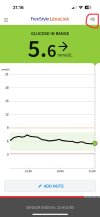
I use the Libre with my iPhone and on the home page I have a scan icon in the top right hand corner (circled in red), which I rarely use now it’s a cgm. However I do use it on the odd occasion when I’ve been away from my phone and there’s a gap in my graph.
Recently I helped a type 2 friend place a Libre and download the app onto her Android phone. She gets gaps in her graphs sometimes but in her android version we can’t find the scan icon. Can someone point us in the right direction please?
2024-02-16 21.16.13.jpeg
 
So no need to click a scan icon?
I've never seen a scan icon in the almost 7 years I used Libre with Android...

Mind, the current UK Libre2 app is slightly different from the Dutch one now yours show real time numbers and ours doesn't.
But you can easily find out by asking her to hold her phone to her arm in different positions and see if it makes a sound and will scan.
 
I am not sure the symbol is significant.
When scanning a sensor, you need to hold the part of the phone with the NFC receiver against the sensor. Maybe on an iPhone, it is close to the symbol you see on the phone.
Sadly, the receiver is at a different place in different phone models but usually at the back of the phone.
Provided the NFC is on (usually somewhere in the settings menu. If there is a search capability, search for NFC.
 
I am not sure the symbol is significant.
When scanning a sensor, you need to hold the part of the phone with the NFC receiver against the sensor. Maybe on an iPhone, it is close to the symbol you see on the phone.
Sadly, the receiver is at a different place in different phone models but usually at the back of the phone.
Provided the NFC is on (usually somewhere in the settings menu. If there is a search capability, search for NFC.
If she's managed to start the sensor in the first place, the NFC should be on and working. :)
 
She says she can do it now, no icon but it would only scan when she took the case off.
 
I just tried scanning with my iPhone in all sorts of positions but it definitely doesn’t scan unless I click the scan icon first!
 
The scan icon on an iPhone is indeed needed to activate a gap filling scan. It is also used for scanning insulin pens.
 
*Waves to friend of @Rachox with a now working sensor*

Hi friend, I hope the sensor will help you work out what works for your diabetes and what doesn't!
I will pass on your msg. thank you. She is learning quickly!
 
Back
Top
